





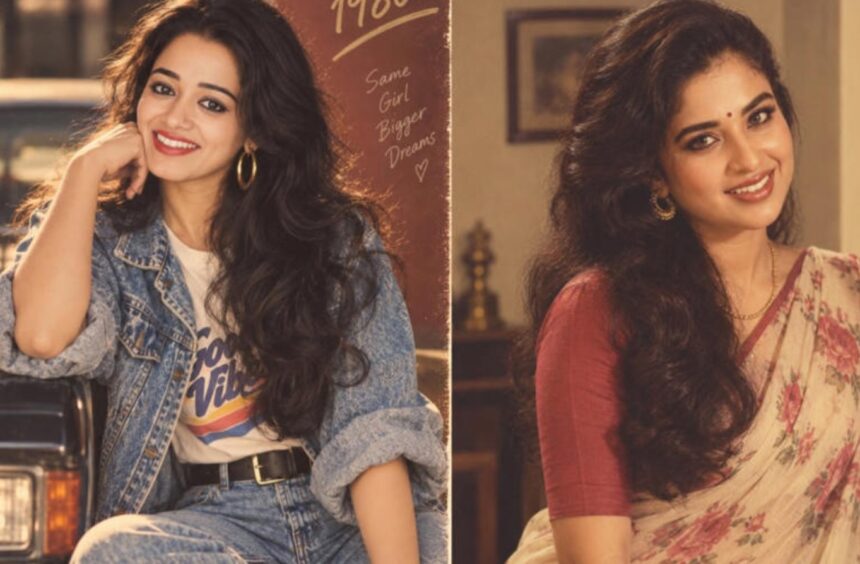
Instagram’s latest AI photo trend is taking users back to the 1980s, turning ordinary selfies and portraits into nostalgic retro photographs. Here’s what the trend is, how it works, and the prompts you can use to create your own vintage-style image with ChatGPT.
Instagram users have found another way to give their photographs a nostalgic makeover.
After AI-generated Studio Ghibli-style portraits, collectible-figure transformations and other viral image trends, the latest wave is focused on the visual language of the 1980s.
People are uploading photographs to ChatGPT and asking for them to be reimagined as vintage portraits. The results can range from glamorous Indian film-inspired photographs to family-album pictures, old studio portraits and deliberately grainy film stills.
The appeal is partly nostalgia. The 1980s had a distinctive visual identity, from bold clothing and dramatic hairstyles to warm photography, saturated colours and the unmistakable texture of analogue film.
What Is the ChatGPT ’80s Photo Trend?
The trend is essentially an AI-powered photo transformation.
A user provides a photograph and describes how they want it to look as an image from the 1980s. Instead of changing the person’s identity completely, the prompt can ask the AI to retain recognizable facial characteristics while changing elements such as clothing, hairstyle, lighting, setting and photographic texture.
For an Indian-inspired version, users might request a vintage saree, classic jewellery, a studio backdrop or styling reminiscent of an old Bollywood portrait.
Others are choosing a more everyday aesthetic, such as a family photograph taken inside an Indian home during the decade.
The final appearance depends heavily on the photograph provided and the instructions used.
Why Are 1980s-Style AI Photos Trending?
The decade has a visual character that translates particularly well into AI image generation.
Bold silhouettes, distinctive hairstyles, analogue film grain and warm studio lighting immediately make a photograph feel different from a contemporary smartphone portrait.
There is also a strong nostalgia factor.
For many users, the look recalls old family albums, wedding photographs, film magazines and classic cinema rather than the highly polished photography common on social media today.
That combination of nostalgia and personalization makes the format particularly suitable for Instagram.
How to Create an ’80s Photo With ChatGPT
You don’t need advanced photo-editing skills to experiment with the trend.
Step 1: Choose a Suitable Photograph
Start with a clear photograph in which the face is visible.
A reasonably well-lit image can make it easier for an image-generation tool to interpret the person’s appearance. A simple background can also help if you want the AI to make substantial changes to the surroundings.
Step 2: Upload the Image
Open ChatGPT and use the image-upload option to provide your photograph.
If you’re transforming somebody else’s photograph, make sure you have appropriate permission to use the image.
Step 3: Describe the Era
Instead of writing only “make this look 1980s,” explain the visual details you want.
You can mention:
- Clothing
- Hairstyle
- Jewellery or accessories
- Background
- Lighting
- Camera style
- Film grain
- Colour treatment
- Mood
- Composition
The more specific the visual direction, the more intentional the result can become.
Step 4: Ask for a Natural Transformation
If you want the person to remain recognizable, explicitly ask the image tool to preserve their distinctive facial characteristics and overall appearance.
You can also specify that you want the image to look like a real photograph rather than an illustration.
Step 5: Refine the Result
The first version may not get every detail right.
Instead of starting from scratch, give targeted feedback. For example, you could ask for a less modern hairstyle, more authentic period clothing, softer film grain or a simpler background.
Prompt for a Glamorous 1980s Indian Portrait
Try this prompt after uploading your photograph:
“Transform this photograph into a realistic 1980s Indian studio portrait. Preserve the person’s recognizable facial characteristics and natural skin tone. Give the person authentic 1980s styling, with period-appropriate clothing, classic hair and tasteful statement accessories. Use warm studio lighting, rich but slightly faded colours, subtle analogue film grain and the texture of an old printed photograph. Keep the image photorealistic and avoid modern objects, contemporary fashion or artificial-looking facial changes.”
This works well if you want a polished vintage portrait rather than a heavily stylized image.
Prompt for a Vintage Indian Family-Album Look
For something more personal and understated:
“Reimagine this photograph as an authentic Indian family photograph from the 1980s. Preserve the person’s recognizable face and natural appearance. Use simple period-appropriate clothing, a modest indoor setting, slightly warm lighting, soft focus and realistic analogue film grain. Make it look like an old family-album photograph rather than a modern AI portrait. Avoid contemporary furniture, electronics, fashion and accessories.”
The result should feel more like a memory from an old photo album than a movie poster.
Prompt for a Classic 1980s Male Portrait
For a retro men’s portrait:
“Turn this photograph into a realistic 1980s Indian male studio portrait. Preserve the person’s recognizable facial characteristics and natural skin tone. Add authentic period styling, including a neatly styled hairstyle, a relaxed tailored shirt and high-waisted trousers. Use warm studio lighting, subtle film grain, slightly faded colours and a simple vintage backdrop. Keep the photograph realistic and avoid modern clothing, accessories and backgrounds.”
Prompt for a Retro Bollywood-Inspired Look
If you want a more cinematic result:
“Transform this photograph into a glamorous, cinematic Indian film portrait inspired by the visual style of the 1980s. Preserve the person’s recognizable facial features and natural skin tone. Use authentic period clothing, expressive but realistic styling, dramatic studio lighting, rich colours, subtle analogue film grain and a vintage photographic finish. The image should feel like a professionally photographed 1980s publicity portrait, not a modern digital photograph.”
Avoid asking the model to reproduce a specific living person’s face or a copyrighted promotional photograph exactly. Describing the era and visual characteristics is a better approach.
How to Make the AI Portrait Look More Authentic
A generic prompt can produce a generic result.
If you want something that feels convincingly period-specific, describe the details that make the decade recognizable.
For example, you could request:
A vintage wedding photograph:
Ask for traditional wedding clothing, period jewellery, an old studio backdrop, soft flash photography and slightly faded prints.
A retro disco portrait:
Specify bold evening clothing, dramatic lighting, large accessories and an energetic late-night atmosphere.
An old magazine portrait:
Request a formal studio composition, controlled lighting, period styling and the texture of a printed magazine photograph.
A middle-class family photograph:
Ask for modest clothing, a domestic Indian setting, simple furniture and the soft imperfections associated with analogue photography.
A classic saree portrait:
Specify a period-appropriate saree, traditional jewellery, vintage hairstyle and a simple studio background.
Ask AI to Remove Modern Details
One of the easiest ways to make a generated photograph feel more authentic is to eliminate objects that immediately reveal the present day.
You can add an instruction such as:
“Remove contemporary visual elements. Do not include smartphones, modern cars, current fashion, LED lighting, contemporary buildings or modern electronic devices.”
This can help prevent the image from looking like a present-day photograph with a vintage filter.
Why Your First AI Image May Not Look Right
AI-generated photographs are not guaranteed to reproduce every detail accurately.
You may notice changes to facial features, jewellery, clothing patterns, hands, fingers, hair or objects in the background.
Text can also be distorted or replaced with meaningless characters.
That’s why generated images should be checked carefully before publication.
If an important detail is wrong, describe the problem specifically in your next instruction rather than simply asking the AI to “fix it.”
For example:
“Keep the face and hairstyle from the previous version, but replace the modern earrings with simple 1980s-style jewellery and remove the smartphone visible in the background.”
Is the ’80s Photo a Real Old Photograph?
No.
An AI-generated transformation should not be presented as an authentic archival photograph.
Even when an image convincingly resembles an old family picture or film photograph, it may have been created recently using generative AI.
If you post the result publicly, describing it as an AI-generated recreation or transformation can prevent viewers from mistaking it for genuine historical material.
Be Careful With Personal Photographs
Before uploading a photograph to any AI service, consider what information appears in the image.
Avoid using photographs that reveal sensitive documents, addresses, financial information, passwords or other private details.
It’s also worth considering whether everyone visible in the photograph is comfortable with their image being transformed and published.
For children or other people whose images you control, take particular care before uploading or sharing the resulting image.
The Best Part of the Trend: Personalization
The most interesting aspect of the ’80s AI trend isn’t simply adding film grain to a selfie.
The technology allows users to explore different versions of the same visual memory.
One photograph can become a formal studio portrait, a vintage wedding image, a Bollywood-inspired publicity photograph or a casual family snapshot simply by changing the instructions.
That makes the trend less about applying a single filter and more about directing an entire visual concept.
Final Takeaway
Instagram’s ’80s photo trend combines AI image generation with nostalgia, giving users a simple way to reinterpret contemporary photographs through a retro visual lens.
The quality of the result depends largely on the source photograph and the specificity of the prompt. Describing the clothing, setting, lighting, photographic texture and period details can produce a much more convincing result than simply asking for an “80s look.”
Just remember that the finished image is an AI-generated recreation, not a genuine photograph from the decade. Check the image for unwanted alterations and avoid uploading sensitive photographs or other people’s images without appropriate permission.